May/10

12

How to Create and Use Church Flyer Templates

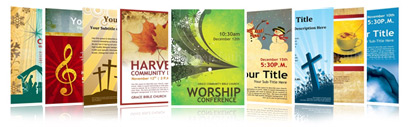
Sharefaith brings you a stunning collection of professionally designed print quality flyers that you can use to announce your church event. Simply download and replace the mock-text with your own.

How to download: Once you selected your flyer template you will see two download options: 1) MS Word and 2) MS Publisher.  Select either of the options according to the program you are most familiar with. Either option will present you with a fully laid-out flyer with placeholder text. Download and save.

Quality (DPI): All our flyer templates are designed in 150 dpi print quality.

Compatibility: Our flyer templates are compatible with Microsoft Word, Microsoft Publisher, Pages and Open Office. For best results we recommend using MS Word and Ms Publisher.

When to use: Church administrators use our flyers to announce upcoming church events. Flyers can be printed and posted on bulletin boards in the church building, handed out at the church entrance, or even distributed around your community. The best events to announce with flyers are major holidays, important church events, church retreats, camps, picnics, special Bible studies, plays, concerts, or event speakers.

Using with MS Word or Publisher: Using our flyers is very simple. Open your downloaded flyer in Word or Publisher. Customize the flyer by replacing the mock-text with your own, then print. You can rearrange the text on the page to create your own layout and even add more graphics.

Sharefaith is the largest online provider of Church Flyers, Christian Flyers, Bible Flyers, Religious Flyers, Sunday School Flyers & Event Flyers: View our collection now!

If you liked this, share with others:
  • Digg
  • StumbleUpon
  • del.icio.us
  • Facebook
  • Yahoo! Buzz
  • Twitter
  • Google Bookmarks
  • email
  • LinkedIn
  • RSS
Print

· ·

4 comments

  • Christopher Lewis · July 2, 2010 at 5:31 pm

    I like the flyers and use them to advertise services at our Church St Mary’s Kings Walden Hertfordshire England.

    I use them for the complete month’s services & generally copy them on to A3 for the notice boards.

    Here we relate flyers to being A5 size – i.e. 2 flyers – landscape on A4 paper.

    Is it possible to convert the flyers to do this?
    I have tried without success.

    Any suggestions?

    Regards

    Reply

    • Admin comment by admin · July 2, 2010 at 6:21 pm

      Hello Christopher,

      Converting the Letter size US format flyers to become A5 size is indeed possible but you will have to do a few tweaks using a photo-editing program like Photoshop, Xara or GIMP. Here is what you need to do:

      1. Open an A5 blank template in your photo-editing program using a 150DPI setting.
      2. Save the background image of the flyer you are using to a file (using either Word or Publisher)
      3. Important the background image into your A5 template and crop the sides to fit perfectly in your desired size
      4. Save the image as a EPS, PNG or JPG
      5. Open WORD or Publisher and set up your A5 or A4 landscape template and import the background image
      6. Place duplicates of the image on the A4 landscape and make sure to apply the SEND-TO-BACK setting so you can place your content on top of the image.
      7. Complete your flyer as desired and print.

      The steps above may sound easier than they really are, but the thing you need to keep in mind is that you will basically have to reconstruct the flyer on your end to fit within the size you want. That will entail cropping and resizing the background image to fit exactly in your desired size. You can also make use of our worship backgrounds, images and clipart as stock resources for creating your own unique flyer. They are all 150-300dpi print quality.

      Depending on how tech-savvy you are with Photoshop, Publisher or Word, this might be a breeze or take a few minutes.

      Hope this helps !

      In Christ!
      Sharefaith Team

      Reply

  • Renee · July 26, 2010 at 9:28 pm

    Is there a way to change the color of flyer template backgrounds

    I’d like to change color for different events of the same sort

    Reply

    • Admin comment by admin · July 26, 2010 at 9:33 pm

      Hi Renee,

      You will have to do so inside Photoshop or any other image editing software. Our backgrounds for flyers and bulletins are all flattened JPEGS or EPS files and for that reason you will not be able to take the different layers apart to just change the color of one element. Hope this answers your question.

      All the best!
      Sharefaith Team

      Reply

Leave a Reply

Spam Protection by WP-SpamFree

<<

>>

Sharefaithblog is part of Sharefaith.com, owned and operated by Letters & Arts. Inc. ©2010 All Rights Reserved.The goal of the Sharefaith blog is to edify, challenge, inform, and improve churches around the world through the use of informational articles and resources. Please note that the views and opinions expressed on the blog articles or comments express that of the respective writers and should not be construed to represent the viewpoint of Sharefaith.